

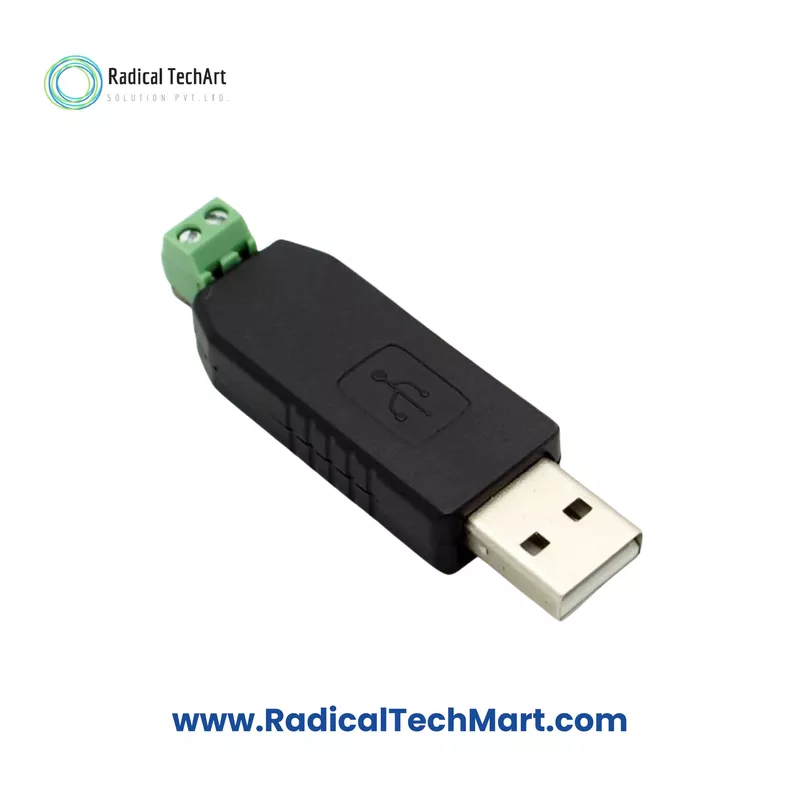


USB to RS-485 Converter Module (MAX13487E + CH340C)
USB to RS-485 Converter Module (MAX13487E + CH340C)
Compact USB-to-RS485 converter with automatic direction control, virtual COM port support, and screw-terminal RS-485 output for industrial communication on Windows, Linux, and other PC platforms.
Customize
Share :
The USB to RS-485 Converter Module (MAX13487E + CH340C) provides an easy way to add an RS-485 interface to any PC with a USB port. The module enumerates as a virtual COM port and converts USB data to 2-wire RS-485 with automatic flow control. It is suitable for industrial communication, data logging, and device configuration tasks where a simple, reliable USB-to-RS485 link is required.
Key Features
Plug-and-play USB to RS-485 converter module
Based on MAX13487E half-duplex RS-485 transceiver
Uses CH340C USB–UART bridge to create a virtual COM port
No external power supply required – powered from USB
Compatible with USB 2.0 / USB 1.1 ports
Supported OS: Windows 7/8/10, Windows XP, Linux (and others with CH340 drivers)
Baud rate support from 75 bps to 115,200 bps (module rating), with hardware capable up to higher speeds
RS-485 output via 2-pin combicon screw terminal (D+ / D-)
Automatic direction control on RS-485 – no manual RTS control needed
Compact module for panel, lab, and field use
Technical Specifications
| Parameter | Value |
|---|---|
| Converter Type | USB to RS-485 |
| USB Interface | USB 2.0 / USB 1.1, Type-A plug (or cable, depending on version) |
| USB–UART IC | CH340C |
| RS-485 Transceiver | MAX13487E (half-duplex, auto direction) |
| RS-485 Mode | 2-wire half-duplex |
| RS-485 Output Connector | 2-pin screw terminal (D+ / D-) |
| Baud Rate Range | 75 bps to 115,200 bps (typical) |
| Maximum Supported Speed | Up to 6 Mbps (hardware capability) |
| Power Supply | From USB port, no external DC required |
| OS Support | Windows 7/8/10, Windows XP, Linux (drivers for CH340) |
| Signalling Method | Differential RS-485 signalling |
| Isolation | Non-isolated (standard version) |
| Operating Use | Virtual COM port to RS-485 network |
| Module Type | PCB module / small USB adapter |
(If your actual hardware has isolation or different connector, we can tweak this later.)
Applications
PC to RS-485 field communication
Configuration of RS-485-based instruments and controllers
Modbus RTU master/slave testing from a laptop or PC
Data logging and monitoring for industrial equipment
Lab use for UART/RS-485 experiments and development
Replacing legacy RS-232 ports with USB-based RS-485
What’s in the Box
1× USB to RS-485 Converter Module (MAX13487E + CH340C)
1× Quick connection/driver information sheet
FAQ (4–6 Q&A)
1) Does this converter need an external power supply?
No. The module is powered directly from the USB port. No extra DC adapter is required.
2) Which operating systems are supported?
The CH340C driver is available for Windows 7/8/10, Windows XP, and Linux. On most systems it appears as a virtual COM port after driver installation.
3) How do I connect my RS-485 network?
Use the 2-pin screw terminal marked D+ and D-. Connect these to the corresponding A/B (or D+/D-) lines of your RS-485 network, observing polarity.
4) Is the RS-485 communication full-duplex or half-duplex?
The converter uses the MAX13487E half-duplex RS-485 transceiver with automatic direction control, so it transmits and receives on the same pair of wires, one direction at a time.
5) What baud rates are supported?
The module supports standard baud rates from 75 bps up to 115,200 bps for typical industrial applications. Hardware design allows higher speeds (up to several Mbps) where drivers and line conditions permit.
6) Can it be used for Modbus RTU?
Yes. As it creates a standard RS-485 COM port on the PC, it can be used with any Modbus RTU master or slave software.